Frosted-glass backgrounds
Background filters add blur and other effects behind interface elements.
Unity 6.6
Apply effects behind elements with backdrop filters Update releaseSupported now
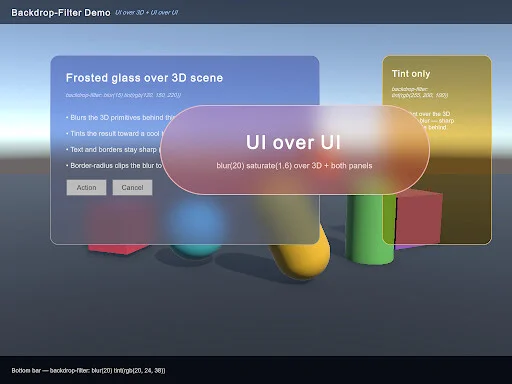
What changed
Unity feature: UI Toolkit backdrop filters
The backdrop-filter style processes the content behind a UI element. It can create a blurred panel while keeping the panel’s own text and controls sharp.
Use it
- Apply backdrop-filter to the UI Toolkit element that should sit above the blurred content.
- Use the manual’s USS examples to choose the filter and tune the effect within the element bounds.
Requirements and limits
- Requires URP and a screen-space panel. Built-in rendering, HDRP, world-space panels, and USS transitions are not supported for this property.