Control shader compilation
New compiler settings unlock newer shader features for DirectX 12.
Unity 6.6
Compile shaders with the DirectX 12 compiler Update releaseSupported now
What changed
Unity feature: DXC shader compilation
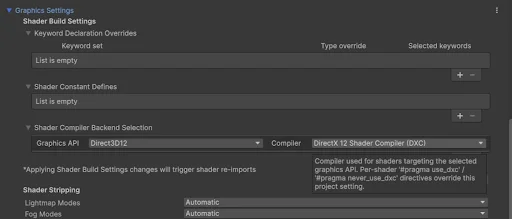
Build profiles can select DXC for DirectX 12 shaders. DXC enables Shader Model 6 capabilities and improves compatibility with modern GPU inspection tools.
Use it
- Open a Windows Build Profile and add Graphics Settings.
- Under Shader Build Settings, add a compiler selection for Direct3D12 and choose DirectX 12 Compiler (DXC).
Requirements and limits
- DXC does not support DirectX 11. Building for both DX11 and DX12 creates separate shader sets. Vulkan and Metal DXC support is experimental in this release.