Import more detailed spatial audio
Unity can import second- and third-order ambisonic clips for more precise 360-degree sound.
Unity 6.6
Set up ambisonic audio in Unity 6.6 Update releaseSupported now
What changed
Unity feature: Second- and third-order ambisonic audio
An ambisonic recording stores sound from every direction and can rotate as the listener turns. Unity 6.6 adds support for second-order clips with nine channels and third-order clips with sixteen channels. These formats can preserve more directional detail than four-channel first-order clips.
Use it
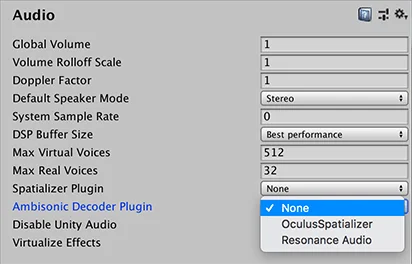
- Open Edit > Project Settings > Audio and select a decoder plug-in that supports the clip’s order and your speaker mode.
- Import a multichannel B-format WAV with ACN channel order and SN3D normalization, then enable Ambisonic in the clip’s Inspector.
- Assign the clip to an Audio Source and leave Spatialize disabled. The ambisonic decoder handles the orientation of the sound field.
Requirements and limits
- Unity 6.6 requires a third-party or custom decoder plug-in. Check the plug-in’s supported channel counts and output modes.