Enter Play mode faster
New projects skip code reloading when you press Play, reducing the wait before testing.
Unity 6.6
Enter Play mode without domain reload Update releaseSupported now
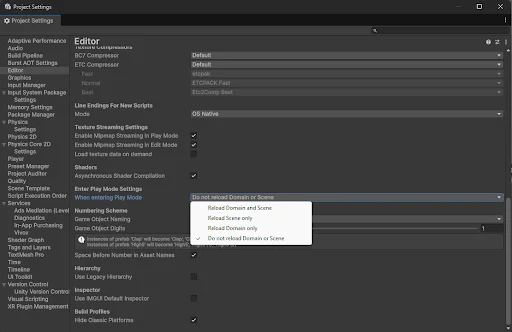
What changed
Unity feature: Fast Enter Play Mode
New projects enter Play mode without reloading the code domain. Scene reload remains enabled by default, but static variables and event subscriptions survive between runs.
Use it
- Open Project Settings > Editor to inspect the Enter Play Mode settings.
- Reset persistent static state explicitly, or use the static-cleanup attributes described in the manual. Project Auditor can flag domain-reload issues.
Requirements and limits
- Existing projects keep their configured behavior. Code that relies on domain reload to clear state must be updated.