Matchmaking reports
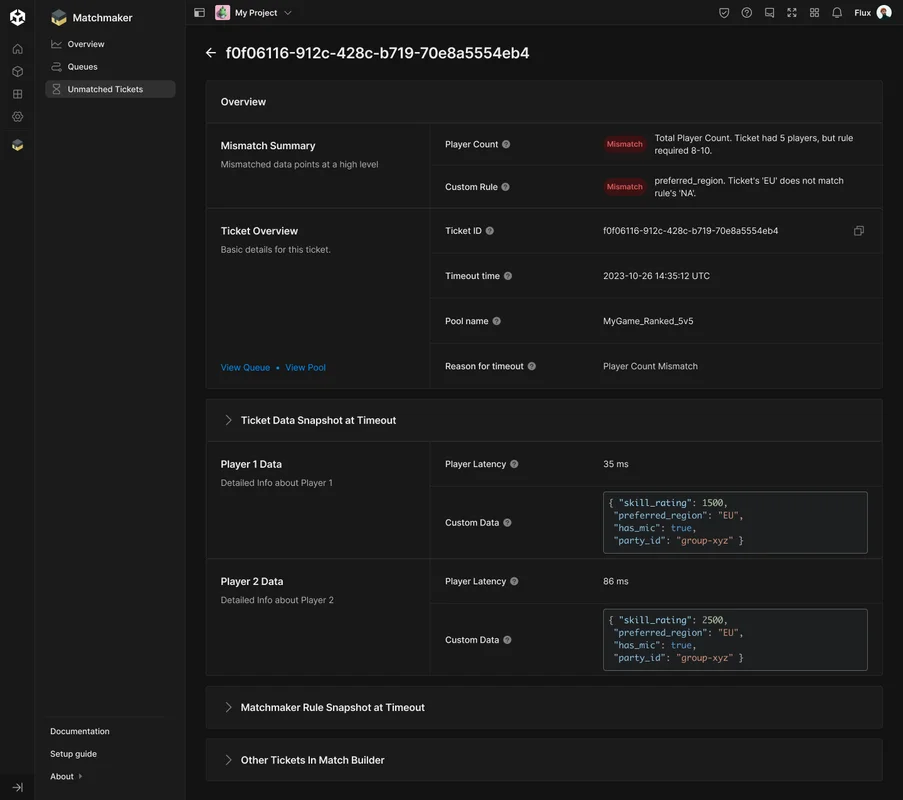
New Matchmaker reports explain why players have not found a match.
Unity 6.4
Matchmaker documentation Update releaseSuperseded
What changed
Unity feature: Matchmaker reports
Matchmaker adds better visibility into ticket activity and unmatched players. Reports can explain why a ticket did not satisfy a pool’s matching conditions.
Use it
- Open the project’s Matchmaker area in Unity Dashboard and inspect the affected ticket or matching report.
- Compare the unmet criteria with the pool and rule configuration; use logs to follow creation, matching, allocation, and backfill activity.
Requirements and limits
- Requires the separate Unity Matchmaker service and access to the project’s Dashboard. These service changes are not an offline Editor feature.